A good friend of mine — the CEO of Telaga Group of Companies — reached out and said something along the lines of:
“Bro, our assets are everywhere. Spreadsheets here, WhatsApp there, maintenance notes somewhere else. We need one system. Can you fix this chaos?”
That wasn’t a feature request. That was an SOS with extra sambal.
Because when leadership says assets are “everywhere,” what they actually mean is: nobody has full visibility. Ownership is unclear, transfers live in WhatsApp, maintenance history depends on memory, and audit season feels like a horror movie with no ending credits.
So instead of proposing meetings, whiteboards, or “let’s align first” sessions… I opened my editor and started building.
The Real Problem Companies Pretend Isn’t a Problem
Most organizations don’t fail asset management because they lack tools. They fail because their tools don’t match reality.
On paper, they have systems. In practice, they have fragments. One spreadsheet for inventory, another for finance, chats for transfers, and someone’s brain for maintenance. Individually, those fragments seem harmless. Together, they create operational blindness — the kind that quietly bleeds money, wastes time, and turns simple questions into investigations.
The fix isn’t “more spreadsheets.” It’s a single source of truth with workflow built in.
I Didn’t Design Pages. I Designed Lifecycle.
I don’t build internal systems screen-first. I build lifecycle-first.
Because assets don’t sit still. They move through states: registered → assigned → transferred → maintained → audited → disposed. If your platform doesn’t understand that lifecycle, it becomes a database wearing a UI costume.
So everything in this system was designed around transitions. Once the transitions are correct, the UI becomes obvious, and the team doesn’t need training slides (which nobody reads anyway).
Structure Without Friction (RBAC + Policies That Don’t Leak)
This system has simple roles — Superadmin, Admin, Manager, Staff — but I didn’t rely on “permissions only” because that’s how you accidentally give someone a bazooka when they only needed a screwdriver.
Even if a permission exists, policy checks still enforce real-world boundaries. Here’s the vibe in code:
// app/Policies/WorkOrderPolicy.php
public function create(User $user): bool
{
    // permissions can be seeded, but policy is the real gatekeeper
    return in_array($user->role, ['Superadmin', 'Admin', 'Manager'], true);
}
So yes, Staff can execute assigned work, but they don’t get to create work orders just because someone accidentally ticked a checkbox in RBAC seeding.
That’s how you keep systems safe from “helpful mistakes.”
Assets Finally Have Identity (Not Just Rows)
When a new asset is added, it isn’t just a row in a table. It gets a structured identity: UUID, asset tag, category, site, department, custodian, warranty, and finance fields. Most importantly: it gets a timeline.
So when someone asks, “What happened to this laptop?” the system doesn’t shrug — it answers.
The “auto asset tag” logic is straightforward but crucial:
// app/Services/AssetTagService.php
public function nextTag(string $prefix = 'TLG'): string
{
    $seq = (int) (Cache::lock('asset-tag-seq', 5)->block(2, function () {
        $n = (int) cache()->get('asset_tag_seq', 1000);
        cache()->forever('asset_tag_seq', $n + 1);
        return $n;
    }));

    return sprintf('%s-%06d', $prefix, $seq);
}
Nothing fancy — just safe sequencing so tags don’t collide when multiple people onboard assets at the same time.
Transfers With Memory (Transfers Are Events, Not Edits)
In many systems, transfer means “edit custodian field.” The old owner disappears. History is gone. Accountability gone with it.
Here, transfer is a workflow. It becomes an event with approval and audit trail. When it’s approved, the asset updates and history is written:
DB::transaction(function () use ($transfer) {
    $transfer->update(['status' => 'approved', 'approved_at' => now()]);

    $asset = $transfer->asset;
    $asset->update([
        'custodian_id'  => $transfer->to_custodian_id ?? $asset->custodian_id,
        'department_id' => $transfer->to_department_id ?? $asset->department_id,
        'site_id'       => $transfer->to_site_id ?? $asset->site_id,
    ]);

    activity()
        ->performedOn($asset)
        ->causedBy(auth()->user())
        ->withProperties(['transfer_id' => $transfer->id])
        ->log('transfer.approved');
});
That’s the whole philosophy: the system remembers so humans don’t have to.
Stocktake Without Drama (Dedupe Scans = Clean Data)
Stocktake is where spreadsheets go to die.
The system runs stocktake as governed sessions. Staff scan QR codes. The system reconciles expected vs verified vs missing vs unexpected. And the nice part: duplicate scans in the same session don’t create messy duplicates — the latest scan wins.
This kind of thing is small but life-saving:
StocktakeScan::updateOrCreate(
    [
        'stocktake_session_id' => $session->id,
        'asset_id'             => $asset->id,
    ],
    [
        'scanned_by_user_id' => auth()->id(),
        'scanned_at'         => now(),
        'note'               => $request->note,
    ]
);
So if someone scans the same asset twice (because camera lag, human lag, or “eh scan again to be sure”), the session stays clean.
QR Tags That Actually Work in the Physical World
A digital system that can’t touch the real world is just vibes.
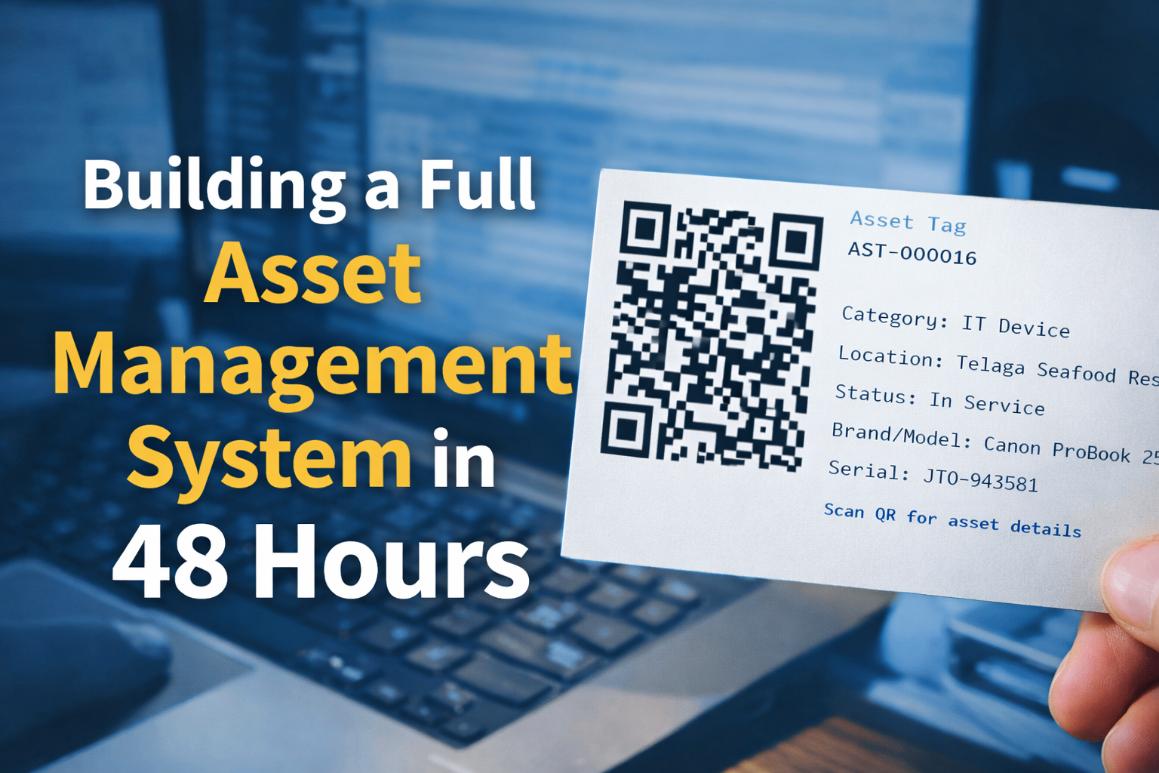
So tags can be generated as single PNGs or bulk A4 PDFs with cutting lines. That makes onboarding and stocktake practical, not theoretical.
Tag rendering is basically:
public function tagPng(Asset $asset)
{
    $qr = QrCode::format('png')
        ->size(260)
        ->margin(1)
        ->generate(route('assets.show', $asset->uuid));

    return response($qr)->header('Content-Type', 'image/png');
}
Now the physical sticker points straight back to the asset record. No typing. No “which laptop is this again?”
Maintenance That Doesn’t Depend on Memory
Maintenance is usually someone’s brain + a WhatsApp message + prayers.
So work orders exist as structured tasks. Staff can update status (completed, pending, reject) with remarks and optional evidence. And once closed/cancelled, it’s locked — because retroactive edits are how truth gets blurry.
A small guard like this stops plenty of nonsense:
if (in_array($workOrder->status, ['closed', 'cancelled'], true)) {
    abort(403, 'This work order is locked.');
}
Notifications That Talk First (WhatsApp/Telegram)
Operations teams don’t sit around refreshing dashboards.
So the system pushes important events out to Telegram and WhatsApp (and includes test buttons in settings, because nobody likes guessing if tokens work).
Borrow reminders, for example, run daily at 9AM local time. Scheduler job:
// routes/console.php
Schedule::command('borrows:send-due-reminders')
    ->dailyAt('09:00')
    ->timezone('Asia/Kuala_Lumpur');
Then the command finds items due soon and sends reminders. The vibe:
$dueTomorrow = Borrow::query()
    ->whereDate('due_date', now()->addDay()->toDateString())
    ->whereNull('returned_at')
    ->get();

foreach ($dueTomorrow as $borrow) {
    $msg = "Reminder: Asset {$borrow->asset->asset_tag} due tomorrow ({$borrow->due_date->format('d/m/Y')}).";
    $whatsapp->sendTemplate($borrow->toCustodian->whatsapp, 'borrow_due_reminder', ['1' => $msg]);
}
Again — not fancy. Just practical. The system nudges before problems happen.
The Moment I Knew It Worked
The real test wasn’t deployment. It was behavior change.
Before, people asked:
“Where is this asset?”
“Who’s holding it?”
“Did we service it already?”
After, they said:
“Check the system.”
That’s the point. Not to build software people admire. To build infrastructure people rely on.
Final Thought
Most developers try to build impressive systems.
I prefer building systems people stop noticing — because they blend into workflow. Quietly. Reliably. Every day.
If your organization is still managing assets across spreadsheets, chat messages, and memory… you don’t have asset management. You have asset guessing.
And guessing always fails eventually.